# API Documentation: Creating an Advertisement
This document provides a step-by-step guide on how to create an advertisement for the marketplace project using the API. Please follow the instructions carefully to ensure the process is done correctly.
## content
- [API Documentation: Creating an Advertisement](#api-documentation-creating-an-advertisement)
- [content](#content)
- [Prerequisites](#prerequisites)
- [Development Guidelines](#development-guidelines)
- [Step One:](#step-one)
- [Step Two:](#step-two)
- [Step Three:](#step-three)
- [Step Four:storing the advertisement (final step):](#step-fourstoring-the-advertisement-final-step)
## Prerequisites
Before proceeding, ensure that you have the following:
- **API Authentication**: Ensure you have a valid API token to authenticate your requests.
- **API Endpoint URL**: The base URL of the API (e.g., `https://marketplac.com/api/v1`).
## Development Guidelines
### Step One:
- [x] **this part is completed**
A user should select a category and you can get the categories through `/api/v1/categories/list`
| param | type | required |
| ---------- | ---- | -------- |
| build_tree | bool | not |
- **Controller**: `App\Http\Controllers\api\v1\CategoryList`
- **Model** : `App\Models\AdvertiseType`
**IMPORTANT**: The model AdvertiseType from this point will be used as *category* in marketplace instead of Term
### Step Two:
[x] **this part is completed**
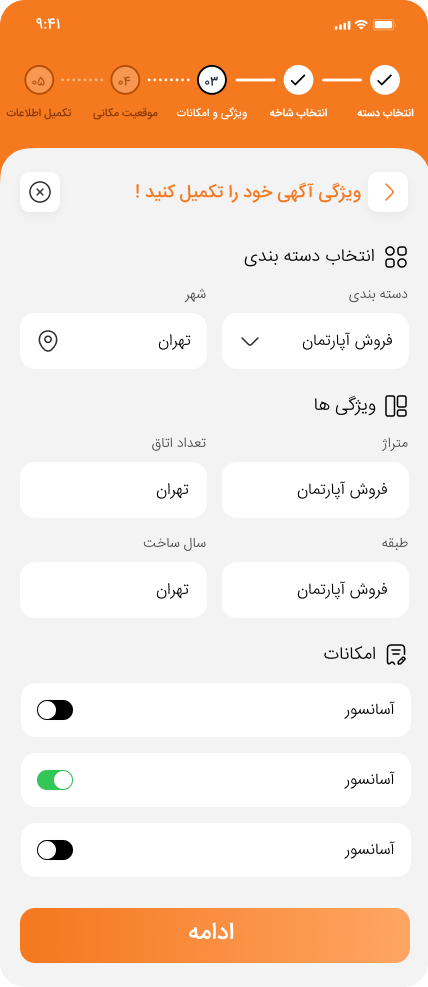 in this part, we should build a form related to the category that has been selected in the last step
so the input is different based on the category that the user selects.
- API Endpoint: `api/v1/get-category-inputs`
- Controller: `AdvertiseTypeAttributesController`
- Model: `AdvertiseType` & `AdvertiseTypeAttributes`
- Resource: `AdvertiseTypeAttributesResource`
- API body:
| param | type | required |
| ----------- | ---- | -------- |
| category_id | int | true |
**steps**
1. Find the category from AdvertiseType
2. If the category has parents get the parent's ID too
3. Get Attributes that have the same id 'advertise_type_id' (use whereIn function)
4. return the attributes
Sample Response:
```json
{
{
"id" : "1",
"label" : " input 1",
"type" : "text",
"name" : "input_1",
"default_value" : "",
"is_required" : "true",
"is_filterable" : "false",
"filter_type" : null,
"is_price_effective" : "false",
"validation" : null,
},
{
"id" : "2",
"label" : " input 2",
"type" : "number",
"name" : "input_2",
"default_value" : "",
"is_required" : "false",
"is_filterable" : "false",
"filter_type" : null,
"is_price_effective" : "false",
"validation" : null,
}
}
```
### Step Three:
[x] **this part is completed**
in this part, we should build a form related to the category that has been selected in the last step
so the input is different based on the category that the user selects.
- API Endpoint: `api/v1/get-category-inputs`
- Controller: `AdvertiseTypeAttributesController`
- Model: `AdvertiseType` & `AdvertiseTypeAttributes`
- Resource: `AdvertiseTypeAttributesResource`
- API body:
| param | type | required |
| ----------- | ---- | -------- |
| category_id | int | true |
**steps**
1. Find the category from AdvertiseType
2. If the category has parents get the parent's ID too
3. Get Attributes that have the same id 'advertise_type_id' (use whereIn function)
4. return the attributes
Sample Response:
```json
{
{
"id" : "1",
"label" : " input 1",
"type" : "text",
"name" : "input_1",
"default_value" : "",
"is_required" : "true",
"is_filterable" : "false",
"filter_type" : null,
"is_price_effective" : "false",
"validation" : null,
},
{
"id" : "2",
"label" : " input 2",
"type" : "number",
"name" : "input_2",
"default_value" : "",
"is_required" : "false",
"is_filterable" : "false",
"filter_type" : null,
"is_price_effective" : "false",
"validation" : null,
}
}
```
### Step Three:
[x] **this part is completed**
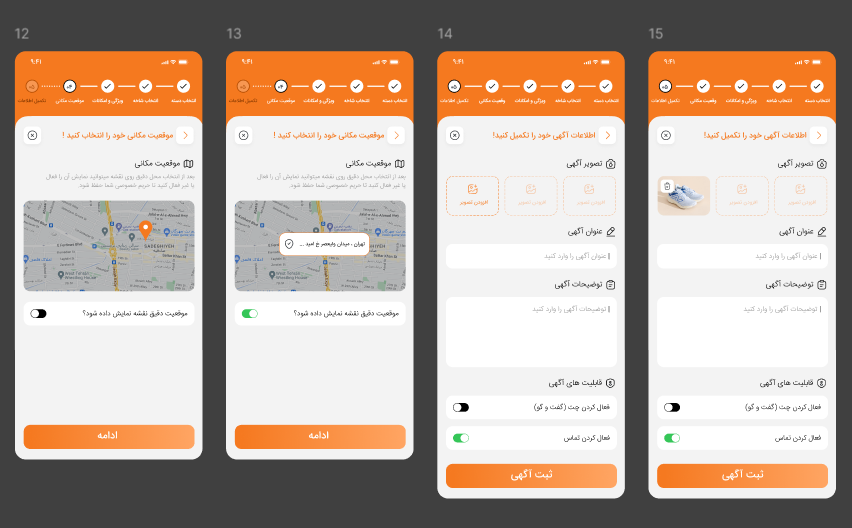 in this part, the form is static and we don't need to do anything special. just remember that these data should be stored in `advertises` table
so this field should be added to the `advertises` table
- long
- lat
- show_exact_location
- chat_is_active
- call_is_active
### Step Four:storing the advertisement (final step):
[x] **this part is completed**
in the final part, we should store the advertisement
- API Endpoint: `api/v1/create-advertise`
- Controller: `AdvertiseController`
- Model: `Advertise` & `AdvertiseType` & `AdvertiseTypeAttributes` & `AdvertiseTypeAttributesValue`
- API body:
| param | type | required |
| ------------------- | ------ | -------- |
| category_id | int | true |
| title | string | true |
| type | string | true |
| price | int | true |
| short_description | string | true |
| is_new | bool | true |
| category_id | int | true |
| category_id | int | true |
| long | string | true |
| lat | string | true |
| show_exact_location | bool | true |
| chat_is_active | bool | true |
| call_is_active | bool | true |
| images | json | true |
| attributes_data | json | true |
Sample Response:
```json
{
"category_id": 21,
"type": "supply",
"title": "Advertisement-title",
"price": 100000,
"short_description": "short-description-for-adv",
"lat": 232321313131,
"long": 4344144424,
"show_exact_location": 1,
"call_is_active": 0,
"chat_is_active": 1,
"is_new": 1,
"images": [
"base-64-image-1",
"base-64-image-2",
"base-64-image-3"
],
"attributes_data": {
"test-attribute-name-1": {
"attribute_id": "test-attribute-id-1",
"attribute_value": "test-attribute-value-1"
},
"test-attribute-name-2": {
"attribute_id": "test-attribute-id-2",
"attribute_value": "test-attribute-value-2"
}
}
}
```
**steps**
1. Create Controller `AdvertiseController`
2. define the route `create-advertise`
3. In Controller
1. Get data
2. Create validation for *attributes_data* based the Category attributes
3. Validate data
4. If validation was successful
1. create advertise
2. store images in advertise_metas
3. store attributes_data in advertise_type_attributes_values
5. Else create JSON data of what the user has sent and then return it
in this part, the form is static and we don't need to do anything special. just remember that these data should be stored in `advertises` table
so this field should be added to the `advertises` table
- long
- lat
- show_exact_location
- chat_is_active
- call_is_active
### Step Four:storing the advertisement (final step):
[x] **this part is completed**
in the final part, we should store the advertisement
- API Endpoint: `api/v1/create-advertise`
- Controller: `AdvertiseController`
- Model: `Advertise` & `AdvertiseType` & `AdvertiseTypeAttributes` & `AdvertiseTypeAttributesValue`
- API body:
| param | type | required |
| ------------------- | ------ | -------- |
| category_id | int | true |
| title | string | true |
| type | string | true |
| price | int | true |
| short_description | string | true |
| is_new | bool | true |
| category_id | int | true |
| category_id | int | true |
| long | string | true |
| lat | string | true |
| show_exact_location | bool | true |
| chat_is_active | bool | true |
| call_is_active | bool | true |
| images | json | true |
| attributes_data | json | true |
Sample Response:
```json
{
"category_id": 21,
"type": "supply",
"title": "Advertisement-title",
"price": 100000,
"short_description": "short-description-for-adv",
"lat": 232321313131,
"long": 4344144424,
"show_exact_location": 1,
"call_is_active": 0,
"chat_is_active": 1,
"is_new": 1,
"images": [
"base-64-image-1",
"base-64-image-2",
"base-64-image-3"
],
"attributes_data": {
"test-attribute-name-1": {
"attribute_id": "test-attribute-id-1",
"attribute_value": "test-attribute-value-1"
},
"test-attribute-name-2": {
"attribute_id": "test-attribute-id-2",
"attribute_value": "test-attribute-value-2"
}
}
}
```
**steps**
1. Create Controller `AdvertiseController`
2. define the route `create-advertise`
3. In Controller
1. Get data
2. Create validation for *attributes_data* based the Category attributes
3. Validate data
4. If validation was successful
1. create advertise
2. store images in advertise_metas
3. store attributes_data in advertise_type_attributes_values
5. Else create JSON data of what the user has sent and then return it